• Skip to content
Mapping Nozbe
Mekk's programming notes
  • Start
  • About
  • Archive
  • Contact
  • My homepage
Wednesday, November 26. 2008

Mapping Nozbe

Posted by
Marcin Kasperski
in Nozbe2XMind

I recently decided to try GTD (Getting Things Done) to make my life more organized. As I use 3 different computers, web application seemed to be a logical choice. After reading a few reviews, and briefly testing five sites, I finally settled on Nozbe, mainly because it seemed as a place which may help me to learn GTD instead of just making it possible to use it.

It is too early for any conclusions, but in general I like Nozbe while I am collecting my tasks and checking my ToDo's. But since I put noticeable number of tasks there, I find it difficult to do a solid review. No way to see the whole thing (and it is not only a Nozbe problem, other sites also do not seem to offer much help here).

So I wrote a tool which helps me to see all my projects and tasks together and at once.

What it does

The script I wrote downloads all projects and tasks (of a given user) from Nozbe and saves them as a mind map.

I picked XMind format as XMind is freely available, crossplatform and just cool (especially the drill-down feature is very handy). This way I get pleasant graphical representation of everything I have pending on my Nozbe account.

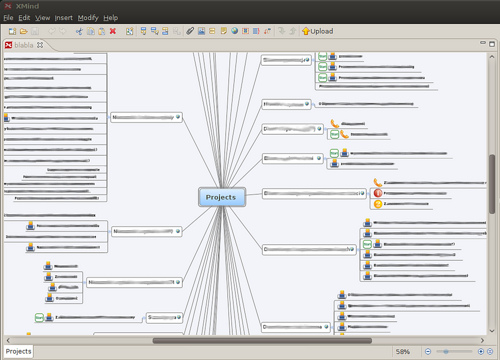
Here is how does it look like (texts are cloaked as those are my true projects):
projects_shot.png

Start marks flag next actions, checkmarks flag done actions, remaining marks signal contexts (there is e legend on the bottom which shows which mark means which context).

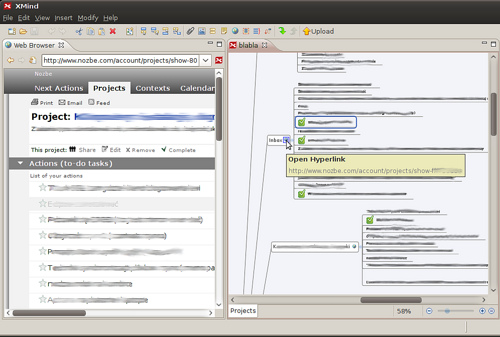
Projecs contain links to their pages on Nozbe, so one can easily open them while viewing the map:
projects_browser_shot.png

In the future I hope to write the reverse part - the tool which would let me modify such a mind map, and upload to Nozbe the changes (in particular I'd like to be able to move actions between projects inside XMind). Nozbe lacks some necessary APIs, but I hope to see them implemented.

Installation

Installation is a bit geeky at the moment. If there is a noticeable interest, I may try to create the binary distribution.

Prerequisities: you must have Python2.5 (2.4 won't work, 2.6 may work but I have not tested it yet) with setuptools and lxml. I test my script on Linux and Windows but it should work everywhere if you get Python and lxml working.

If it looks like a black magic to you, just:

  1. Download Python 2.5.2 from this page and install it (there is a Windows installer).

  2. Download SetupTools for Python 2.5 from this page (download links are on the bottom, again there is a Windows installer).

  3. Make sure both the Python installation directory and its scripts subdirectory are in your PATH (on Windows open Control Panel, pick System, visit Advanced tab and pick Environment variables, find PATH and edit it adding C:\Python25;C:\Python25\Scripts to it.<br/> Or remember about point 5.

  4. Open the console (simplest Windows way: Start/Run and enter "cmd")

  5. Unless you configured your PATH, type

    PATH=C:\Python25;C:\Python25\Scripts;%PATH%

  6. Type:

    easy_install lxml==2.1.3

    (this version is not strictly required, it just has binary Windows build available)

Having done this (or having those components already installed), install my script by:

easy_install http://mekk.waw.pl/download/nozbe2xmind/mekk.xmind-0.1.0-py2.5.egg
easy_install http://mekk.waw.pl/download/nozbe2xmind/mekk.nozbe2xmind-0.1.3-py2.5.egg

Finally, install XMind.

Usage

In the console, issue the following command

python -m mekk.nozbe2xmind.run --key=*your-api-key* --out=c:\mynozbe.xmind --verbose

Your api key can be found on the bottom of the Nozbe Extras page. Note that this key is secret (it works as your password), do not give it to anybody, do not post it to forums etc. You can omit --verbose if you don't want to see which requests are made.

When the script finishes (it may take a minute or two if you have many projects), open the created file (here - c:\mynozbe.xmind) in XMind and play with it.

That's all.

Future

Not yet determined. But I consider the following improvements:

  • fine-tuning the content of a map (maybe adding project tags, maybe using colors, maybe reorganizing the map somehow - ideas welcome, the current view is just a first attempt),

  • creating simple GUI to avoid command line,

  • writing xmind2nozbe part (so you could edit the mind map, save it, then run this script to have changes you made on the map transferred back to Nozbe).

Remarks?

Add to:
  • Digg
  • StumbleUpon
  • Delicious
  • Facebook
  • Reader
Comments (6) | Trackbacks (3)
Defined tags for this entry: mind-map, nozbe, python, xmind
Related entries by tags:
Nozbe2XMind updated, project sources published
Bitbucket-ing some of my projects
Nozbe2XMind screencast
Mapping Nozbe update - better looking map
How to write a FICS bot - part V, chatting
< How to write a FICS bot - part V, chatting | What my blog software is doing for me >
Trackbacks
Trackback specific URI for this entry
Nietypowe zastosowanie XMinda
Próbuję się ostatnio wdrożyć w GTD (Getting Things Done), czyli modną od paru lat technikę zapisywania i porządkowania rzeczy do zrobienia. Sam pomysł by zapisywać sprawy i pomysły to nihil novi (czego ja już nie używałem - od issue trackera i różnych si
Weblog: Notatnik zapisywany wieczorami
Tracked: Nov 27, 23:57
Mapping Nozbe update - better looking map
I updated a little bit my export Nozbe as mind map script. The script is still one-sided (upload to Nozbe is not yet implemented), but the generated map looks a bit better. Before going into details, some pictures. Example map: The map is indeed relate
Weblog: Mekk's programming notes
Tracked: Dec 06, 18:45
Nozbe2XMind - it is possible to save back!
Big, important update to my export Nozbe as a mind map script. It is now possible to save changes made on the mind-map back to Nozbe! Smaller changes also present in this release: download actions as CSV file (to be viewed in OOCalc, Excel or other spr
Weblog: Mekk's programming notes
Tracked: Dec 20, 02:31
Comments
Display comments as (Linear | Threaded)

I am a non-techie user that is comfortable following instructions - but can't troubleshoot when something isn't working. I would love to use Nozbe2XMind but am getting the following error when trying to install the "easy_install http://mekk.waw.pl/download/nozbe2xmind/mekk.nozbe2xmind-0.1.3-py2.5.egg" script.

This is the error: error: Setup script exited with error: Python was built with Visual Studio 2003 extensions must be built with a compiler than can generate compatible binaries. Visual Studio 2003 was not found on this system. If you have Cygwin installed, you can try compiling with MingW32, by passing "-c mingw32" to setup.py.

Any suggestions?

Thanks,

Brian

#1 Brian on 2008-12-21 06:17 (Reply)

It looks like you failed to install binary lxml distribution and the setup script is trying to compile lxml library - and fails to find the compiler (logically, you don't have it installed)

Did you try

 easy_install lxml==2.1.3

PS I am to work on preparing some 'non-techie' distribution, just wanted to release for testing for those who can manage techie stuff.

#1.1 Marcin Kasperski (Homepage) on 2008-12-21 10:31 (Reply)

Here are both installs: 1) easy_install lxml==2.1.3 install and 2) easy_install http://mekk.waw.pl/download/nozbe2xmind/mekk.nozbe2xmind-0.1.3-py2.5.egg

Microsoft Windows XP [Version 5.1.2600]
(C) Copyright 1985-2001 Microsoft Corp.

C:\Documents and Settings\Brian Tait&gt;easy_install lxml==2.1.3
Searching for lxml==2.1.3
Best match: lxml 2.1.3
Processing lxml-2.1.3-py2.5-win32.egg
lxml 2.1.3 is already the active version in easy-install.pth

Using c:\python25\lib\site-packages\lxml-2.1.3-py2.5-win32.egg
Processing dependencies for lxml==2.1.3
Finished processing dependencies for lxml==2.1.3

C:\Documents and Settings\Brian Tait&gt;easy_install http://mekk.waw.pl/download/no
zbe2xmind/mekk.nozbe2xmind-0.1.3-py2.5.egg
Downloading http://mekk.waw.pl/download/nozbe2xmind/mekk.nozbe2xmind-0.1.3-py2.5
.egg
Processing mekk.nozbe2xmind-0.1.3-py2.5.egg
removing 'c:\python25\lib\site-packages\mekk.nozbe2xmind-0.1.3-py2.5.egg' (and e
verything under it)
creating c:\python25\lib\site-packages\mekk.nozbe2xmind-0.1.3-py2.5.egg
Extracting mekk.nozbe2xmind-0.1.3-py2.5.egg to c:\python25\lib\site-packages
mekk.nozbe2xmind 0.1.3 is already the active version in easy-install.pth

Installed c:\python25\lib\site-packages\mekk.nozbe2xmind-0.1.3-py2.5.egg
Processing dependencies for mekk.nozbe2xmind==0.1.3
Searching for Twisted
Reading http://pypi.python.org/simple/Twisted/
Reading http://twistedmatrix.com/
Reading http://www.twistedmatrix.com
Reading http://twistedmatrix.com/products/download
Reading http://twistedmatrix.com/projects/core/
Best match: Twisted 8.1.0
Downloading http://tmrc.mit.edu/mirror/twisted/Twisted/8.1/Twisted-8.1.0.tar.bz2
#md5=a575f29ead4cc02c54e9061d0e6ac7c3
Processing Twisted-8.1.0.tar.bz2
Running Twisted-8.1.0\setup.py -q bdist_egg --dist-dir c:\docume~1\briant~1\loca
ls~1\temp\easy_install-wbflgf\Twisted-8.1.0\egg-dist-tmp-8rgym7
error: Setup script exited with error: Python was built with Visual Studio 2003;

extensions must be built with a compiler than can generate compatible binaries.
Visual Studio 2003 was not found on this system. If you have Cygwin installed,
you can try compiling with MingW32, by passing &quot;-c mingw32&quot; to setup.py.

C:\Documents and Settings\Brian Tait&gt;
#1.1.1 Yep, I installed easy_install lxml==2.1.3 on 2008-12-21 16:11 (Reply)

It seems to be realted to Twisted Matrix web client. Main package is dependant upon this one and installation fails. I've been able to download it as an standalone package from:

http://twistedmatrix.com/trac/wiki/Downloads

Hope it helps!

P.D I couldn't make it work even with this package installed as some dependencies failed too. I'll try tomorrow to troubleshoot it ;)

#1.2 satch on 2009-02-07 03:50 (Reply)

I came to the Nozbe specifically to look for Nozbe and Xmind integration, so really appreciate your work on this. However, I am not technical enough that I want to be working with code.

Are you still working on this?

Thank you!

#2 Zack on 2009-12-04 16:34 (Reply)

I am currently polishing the source to properly publish it on bitbucket in case somebody would like to help (in particular, python library to generate and parse xmind mindmaps is already published).

As far as my own work is considered, well...

  1. I haven't clarified my opinion about Nozbe 2.0 yet. To say the true, I am not very happy with the direction it took, also - my needs changed a bit. It does not yet mean that I will switch to some other tool, but I plan to take a look at the alternatives and I am not 100% commited to staying with Nozbe, so I hesitate to spend time on this project.

  2. I do not have up to date API documentation for all the changes which happened there (current code still works but I have no way to handle - say - multicontexts). Michael promised to publish those docs, so I wait for them to appear. Note: this API does not provide all information needed, what is needed is the sync api (the same which is used by iphone app).

  3. After some preliminary attempts I decided that I am not really interested in developing GUI interface, that's the kind of programming I am not very proficient at. Also, I do not use Microsoft Windows anymore, so I won't be able to prepare binary builds for this platform.

To summarize:

a) All project sources will be properly published and project organised so other developers could help if interested. It is to happen soon.

b) In case sync api is published, I will strongly consider getting back to the the application and extending it at least a little bit (I strongly consider exporting the view which would make it easier to reorganize context assignments, I also think about filtered view showing only projects marked by some tag)

c) I won't develop GUI (I could help if somebody wanted to do it)

d) I won't prepare binary windows installer.

#2.1 Marcin Kasperski (Homepage) on 2009-12-04 17:39 (Reply)
Add Comment
E-Mail addresses will not be displayed and will only be used for E-Mail notifications


Markdown markup is allowed in comments. Examples:

[link text](http://link.to.some/where.html)

Some *emphasized text*

> Quoted text, for example
> article fragment

Source code (4 spaces indent):

    int i = 7;
    int j = 8;

  • © 2008-2009, Marcin Kasperski, All rights reserved.