I updated a little bit my export Nozbe as mind map script. The script is still one-sided (upload to Nozbe is not yet implemented), but the generated map looks a bit better.
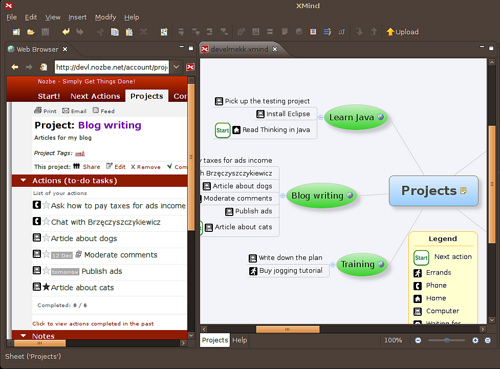
Before going into details, some pictures. Example map:
The map is indeed related to the Nozbe tasks:
Installation
Installation of all necessary prerequisities is covered in previous article. Once you have python, setuptools, lxml and xmind installed, execute the following:
easy_install http://mekk.waw.pl/download/nozbe2xmind/mekk.xmind-0.2.1-py2.5.egg
easy_install http://mekk.waw.pl/download/nozbe2xmind/mekk.nozbe2xmind-0.2.1-py2.5.egg
mekk.xmindis my generate XMind maps from Python module.mekk.nozbe2xmindcontains the actual script code.You can always check nozbe2xmind directory for newer versions in case I forget to announce them here.
Last step of installation, not covered previously, is necessary to use Nozbe icons to mark contexts. Do the following:
- download the NozbeIconsMarkerPackage.xmp file and save it locally
- run XMind
- select
Import...from theFilemenu - select
Marker Packagein the window displayed and clickNextbuttom on the bottom of the window - select
From File, clickBrowse..., find the the file you downloaded - click
Finish
Since then you will see the Nozbe icons as custom markers. Would you ever
want to remove them, visit XMind preferences (Preferences in Edit menu),
select MindMap/Markers and remove the groups you do not need.
Icons need to be installed only once. XMind remembers them permanently.
Usage
Just like previously, run:
python -m mekk.nozbe2xmind.run --key=*your-api-key* --out=mynozbe.xmind
in your console (Start/Run and cmd). The script should output something like:
Loading projects...
   DONE.
Loading actions from project Christmas preparations
   DONE.
Loading actions from project Inbox
   DONE.
Loading actions from project Learn Java
   DONE.
Loading actions from project Blog writing
   DONE.
Loading actions from project Training
   DONE.
Loading contexts
   DONE.
Saved to mynozbe.xmind
Open the created file in XMind and enjoy.
Changes since the previous version
Detailed list of changes since the previous version:
- Nozbe icons are used to mark contexts (instead of semi-randomly picked XMind icons),
- projects are coloured to distinguish them from actions,
- markers meaning is explained using legend instead of sub-map.
Fixed bugs:
- the script crashed if user had an empty project.